Here is a spot I just cut for a group in Salt…
FCP Guru
Last month I had the great pleasure of working with Matthew Celia…
Funny Editor Video
So this video is hilarious. I should be back to posting soon.…
True to My School
I saw this and was fairly bummed in the first 5-10 seconds,…
Starting with Compressor
Here is a post for getting started with Compressor. In most cases, you have the software and have no idea what it does or how it could save you a lot of time or you just never learned it. That’s okay. I am surprised how many people use Final Cut Studio, but don’t take advantage of this huge timesaver. The best part about FCP7, to me, is that you can render using compressor in the background while you continue to edit in Final Cut Pro.
However, for this post, let’s talk about getting started. You have an AVI or MPEG file and you want to make it editable in Final Cut Pro.
Open Compressor.
Changing Red Color Data in Media Composer 5
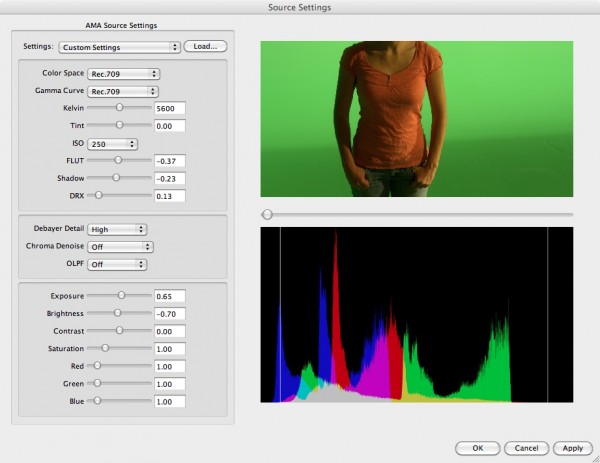
I don’t work with the RED all too much, I do use it from time to time. One of the new advantages of Media Composer 5 is the ability to import R3D files through AMA and edit them natively.
I loaded up some files on my MacBook Pro (without any other accelerator attached, like the MXO2 mini) and started to edit some pieces. It stuttered here and there, but I put most of the blame on the speed of my computer. I changed the draft quality to “best performance” (all yellow if you read the last blog post) and it seemed to work very well. I think it works better than the H.264 through AMA edit, but more on that another time.
MC5: Video Quality Control with XDCAM
Today’s piece is focused on changing the quality of the clips you…
iPhone 4 Camera: Test on Colors Outside
I have been out of town for a while networking, going to…
Changing the Frame Size in Avid Bins
In the midst of my daily afternoon brain fart, I could not…