Why I Love Clip Colors | Post Fifth Pictures
Post Fifth Pictures

Film & HD Editing. Read. Learn. Cut.

  • About
  • Bios
  • Clients
  • Contact
  • Demo
  • GoPro Rentals
  • Rate Card
  • Blogging
  • Class
  • Design
  • Featured
  • Film | Video Editing
    • Commercial
    • Documentary
    • Narrative
  • Guest Speaker
  • Motion Graphics
  • Post Production Workflow
  • Producing
  • Reviews
  • Social Media

Why I Love Clip Colors

Posted on January 13, 2010 by Bryce Randle

ClipColorI love the clip colors feature in Avid Media Composer. It is so helpful. If you haven’t ever used it to its advantage, check it out.

From the hamburger menu in the bottom left corner of the timeline, select clip color. You have several options. The ones I use the most are HD/SD and offline.

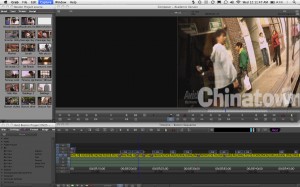
I have this sample project open. It’s an SD project so I changed the settings to 1080 (HD) and then I turn on the HD/SD setting in the clip color. I can now see all of the titles stay one color and the clips become highlighted in yellow.

This shows the difference in the clips. Awesome, huh? It’s great when you are doing a digital cut and something wants to take up a bunch of your time because it says there is an HD clip in your SD output, the clip color shows you the problem. Check the example to the right.
FullScreen

Popularity: 8% [?]

This entry was posted in Blogging, Film | Video Editing, Post Production Workflow and tagged avid, clip color, hd clips, sd clips, separate hd and sd, sort clips. Bookmark the permalink.

5 Responses to Why I Love Clip Colors

  1. Scott Simmons says:
    January 13, 2010 at 10:41 AM

    I use them on a music video to color different performance setups different colors. Then it’s an easy look at the timeline to see what you’re using, what you’re not. FCP’s clip coloring sucks by comparison.

  2. Bryce Randle says:
    January 13, 2010 at 10:56 AM

    I agree with that wholeheartedly.

  3. Mark says:
    January 13, 2010 at 10:13 PM

    I’m a newby at MC – how do you change the settings of a project between HD and SD? When I’m in a 1080 project, I look under the format tab and the only options I get are other HD resolutions.

  4. Bryce Randle says:
    January 13, 2010 at 11:02 PM

    I will make a short tutorial on that tomorrow, but there should be another at the bottom for SD. Typically there is anyway.

  5. Bryce Randle says:
    January 14, 2010 at 12:17 PM

    Mark, could you send me some more details so I can add them to my post? E-mail me at bryce at postfifthpictures.com.

    Thanks!

Leave a Reply Cancel reply

Your email address will not be published. Required fields are marked *

*

*

You may use these HTML tags and attributes: <a href="" title=""> <abbr title=""> <acronym title=""> <b> <blockquote cite=""> <cite> <code> <del datetime=""> <em> <i> <q cite=""> <strike> <strong>

  • Search

  • Connect with us:
  • Humans.txt
  • Twitter
  • Facebook
  • Subscribe
  • © Copyright 2012 Debut - All Rights Reserved
  • Designed by: Luke McDonald | WordPress | Log in
8 visitors online now
1 guests, 7 bots, 0 members
Max visitors today: 17 at 09:29 am UTC
This month: 24 at 02-04-2012 07:41 pm UTC
This year: 38 at 01-17-2012 06:31 am UTC
All time: 93 at 05-13-2011 10:03 am UTC